LOAD CELLS · RFID · ACCESS CONTROL · DATA

Technology Behind Smart Inventory Systems

ERGO inventory monitoring combines storage-position weighing, access control and selected software workflows. Understanding what each technology measures makes it easier to choose an accurate, useful installation.

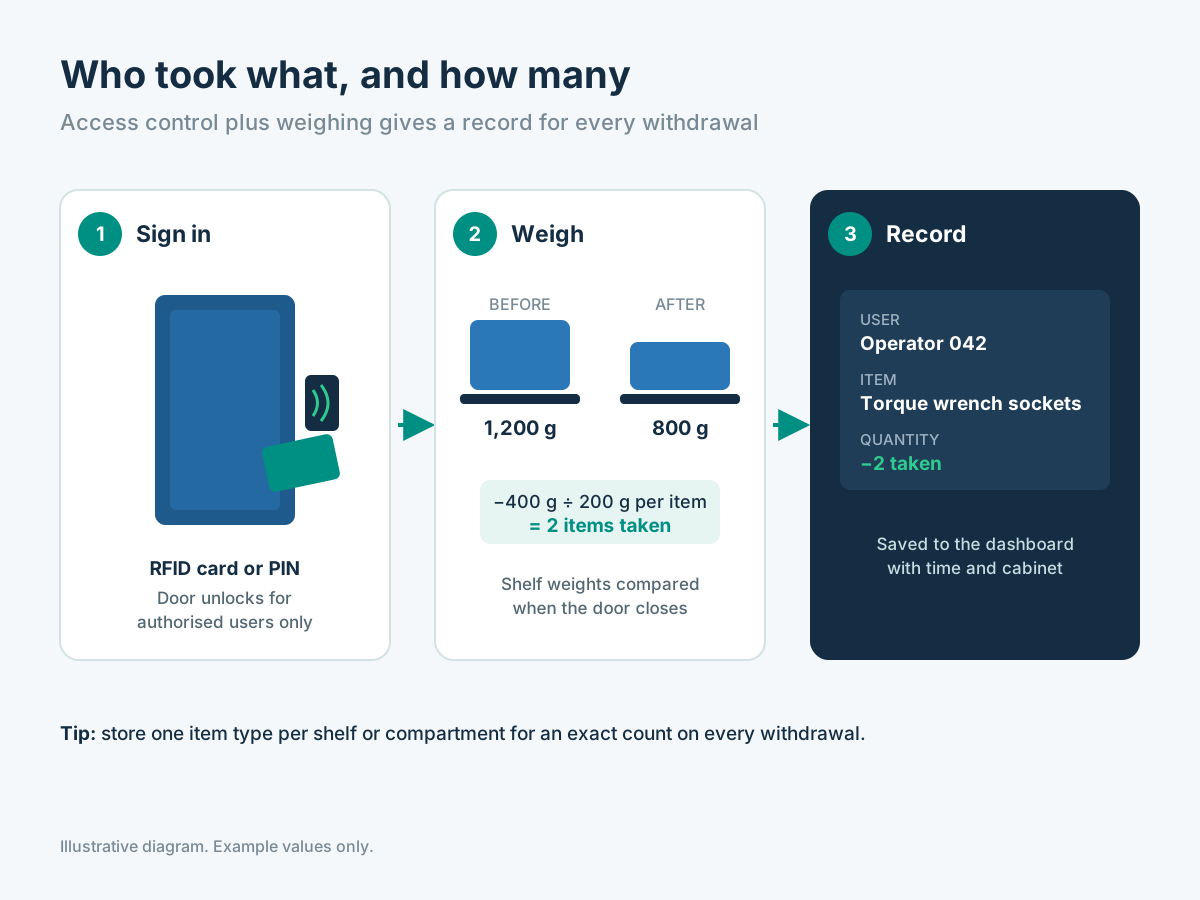
Illustrative secure cabinet access session combined with weighing data
Illustrative technical diagram / application visualization

Measure the item. Identify the person. Connect the information.

THE SYSTEM EXPLAINED

The technology layers behind each record

There is no single technology that identifies every item, counts every part and controls access. Suitable installations combine specific sensing and authorization methods.

01

Load cells and measurement electronics

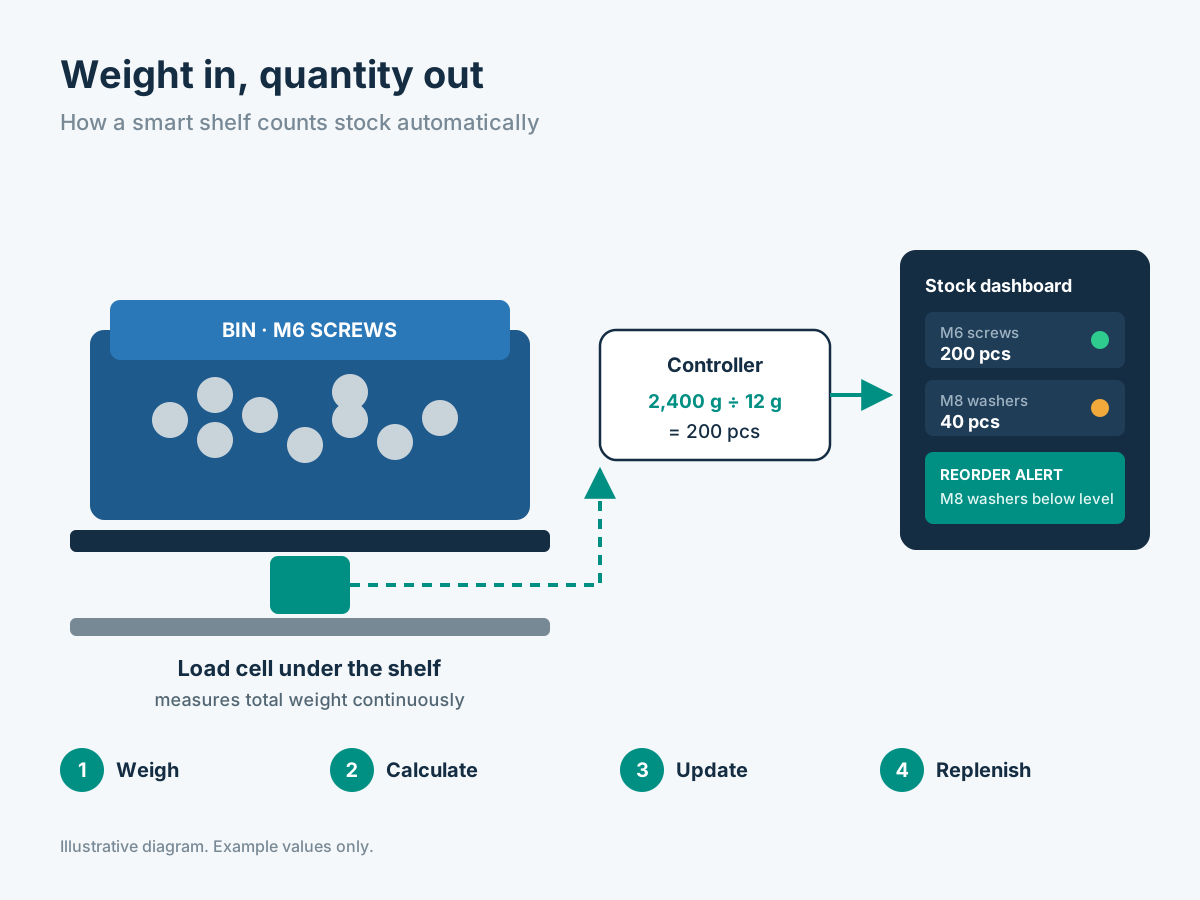
A load cell converts the mechanical force of a supported weight into an electrical signal. The measuring assembly includes structural supports, sensor mounts, appropriate electronics and calibration. The important engineering question is not simply the load cell's published capacity but whether the complete installation reads the stock movement consistently.

A well-designed position holds its loads predictably and gives the sensor a clear measurement path. Cable protection, noise filtering, temperature effects, vibration, container tare and overloaded positions are considered during commissioning. The selected controller associates a reading with a defined stock location.
Load cells and measurement electronics
Illustrative
02

Quantity calculation and stock positions

For known and consistent items, software converts net stock weight into an item count using the calibrated unit weight. Multiple positions can represent different part numbers on the same rack or cabinet. Separate measuring zones matter because a combined weight cannot by itself distinguish which of two mixed products moved.

The intended accuracy is confirmed with representative materials: an empty position, a typical full position, the smallest normal withdrawal and a refill. If an item varies substantially in weight, the system may need a different packing approach, an additional reader or a more appropriate identification method.

03

RFID, PIN and controlled cabinet access

An RFID access card or PIN identifies an authorized user before a cabinet or drawer opens. It can associate the measured quantity change with that person's controlled session. The access controller manages permissions and the time of opening; the weight sensor reports stock movement. These are related but distinct records.

Item-level RFID is another application: compatible tags on returnable tools or other assets can be detected by an appropriate reader. Tag reliability depends on the item material, antenna placement and operating environment. It should not be confused with an RFID access card identifying the employee.

RFID, PIN and controlled cabinet access
Illustrative
04

Indicators and operator interfaces

Shelf-edge LEDs and status lights can direct a stores user to the correct position or highlight one that requires a refill. A cabinet touchscreen or tool-crib kiosk may let an authenticated operator select an item, issue it, return it or review current availability. The selected interface should be simple enough for daily factory use.

Signals and displays need a clear purpose: guiding a pick, confirming authorization or showing a low-stock location. Their presence is chosen with the cabinet, sensing electronics and software configuration, rather than assumed to be included in every ERGO product.

05

Connectivity, reporting and system integration

Measurement controllers may pass data through wired industrial connections or selected network interfaces, depending on the configuration. The inventory application organizes positions, item master data, reorder levels, recorded movements and user permissions. It then presents reports for stores, purchasing and managers.

ERP/WMS exchange, supplier access, exports and notification channels should be defined as specific integration requirements. Before delivery, the team should agree the actual interface, timing, authorization, exception handling and acceptance tests. A clear data contract matters more than listing connectors that have not been verified.

TECHNOLOGY SELECTION

Weight vs barcode vs RFID — which is appropriate?

Choose the identification or counting method based on the stock and transaction that needs to be captured.

MethodWhat it measures or detectsStrong applicationsWhere it needs support
WeighingNet weight change at a known positionConsistent consumables, fasteners, supplies in binsMixed SKUs, packaging changes, user identity
Barcode / QRA deliberate code scanTool issue/return, receiving, serialized assetsMissed scans, no passive live quantity reading
Item RFIDPresence of compatible tagged itemsReturnable tools and individually identified assetsMetal environments, antenna coverage, tag cost
RFID / PIN user accessAuthorized person and sessionRestricted cabinets and tool cribsNeeds stock sensing or item scan to know what moved
CONFIGURATION CHECKLIST

Five technology checks before choosing sensors

01

Material

Define size, unit weight, packaging, metal content and expected item variation.

02

Accuracy need

Specify the smallest relevant pick and maximum total load.

03

Storage geometry

Check vibration, access space, mounting and cable protection.

04

Identity

Decide which people, tools or transactions must be identified.

05

Interfaces

Identify required screens, reports, security rules and approved business software.

Frequently asked questions

Does an RFID access reader count stock?

No. RFID access authorizes a person. Counts come from weighing zones, item tags or another stock-tracking method.

Can the same installation combine sensors and RFID?

Yes. Suitable cabinets can combine controlled authorization with weight sensing and configured transaction records.

MOVE FROM CONCEPT TO CONFIGURATION

We can help select the right smart inventory system.

Tell us about the items, users and locations involved. We can review the measuring positions, access workflow and replenishment requirements.

Request a Configuration →