FROM SENSOR TO STOCK REPLENISHMENT

How Smart Inventory Monitoring Works

A smart shelf does more than show a weight. It connects calibrated storage positions to item counts, access events, stock views and replenishment rules, helping operations act on inventory changes.

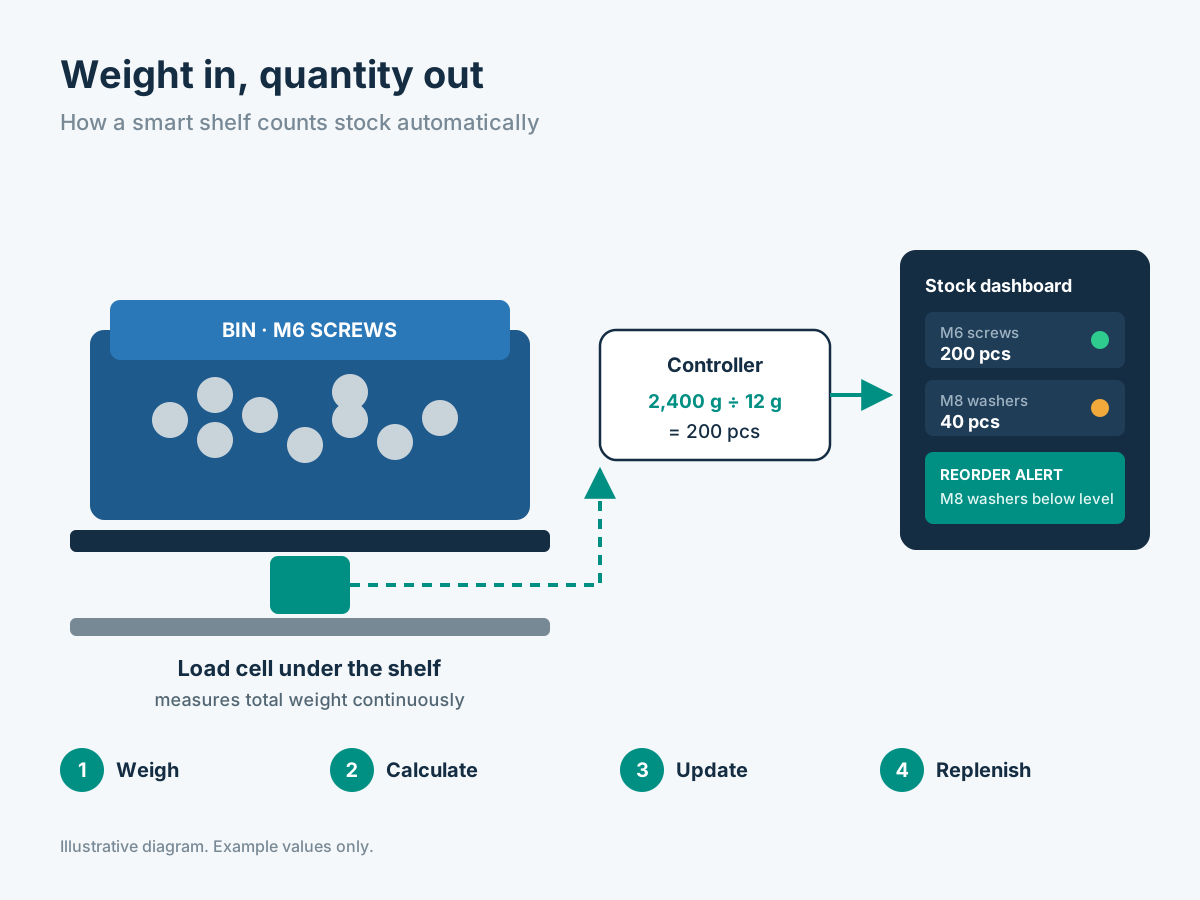
Illustrative load cell weighing and counting workflow for smart inventory shelves
Illustrative technical diagram / application visualization

Four connected steps turn stored materials into actionable inventory data.

THE SYSTEM EXPLAINED

From the shelf to the stock record

The measurement must start with a defined item and storage location. Sensor selection, calibration and the daily work process determine how useful its numbers become.

01

01. Sense — measure stock at a defined position

A load cell measures the force from materials resting on a dedicated shelf, platform or bin. The sensor is mounted under a stable structure and sends readings through the selected electronic controller. Each configured position has a unique location in the inventory system, so a change can be associated with the correct rack, shelf or compartment.

Unlike a handheld barcode scan, a weighing position can take measurements without a person initiating a transaction. Changes become visible when stock is removed or replenished. Good mounting, stable loading, secure cables and proper isolation from vibration all contribute to a useful measurement.
01. Sense — measure stock at a defined position
Illustrative
02

02. Calibrate — turn net weight into a count

During configuration, the system records the empty container or shelf tare and a representative weight for the item stored there. It subtracts tare from the measured load and divides the remaining weight by the configured unit weight. For a bin of consistent fasteners, this produces a calculated item quantity.

One known SKU per measuring position gives the clearest count. Packaging changes, variable part weights, mixed-item bins and operators leaning against the rack can make an interpretation uncertain. An application trial helps select a sensor range and validates the smallest stock movement that matters to the customer.

03

03. Monitor — record movement and exceptions

The system connects the calculated stock count with the position, item description and its configured reorder threshold. It can show whether a location is sufficiently stocked or needs replenishment. It can also store stock changes over time, so the team can review consumption across a shift, a factory line or an entire storeroom.

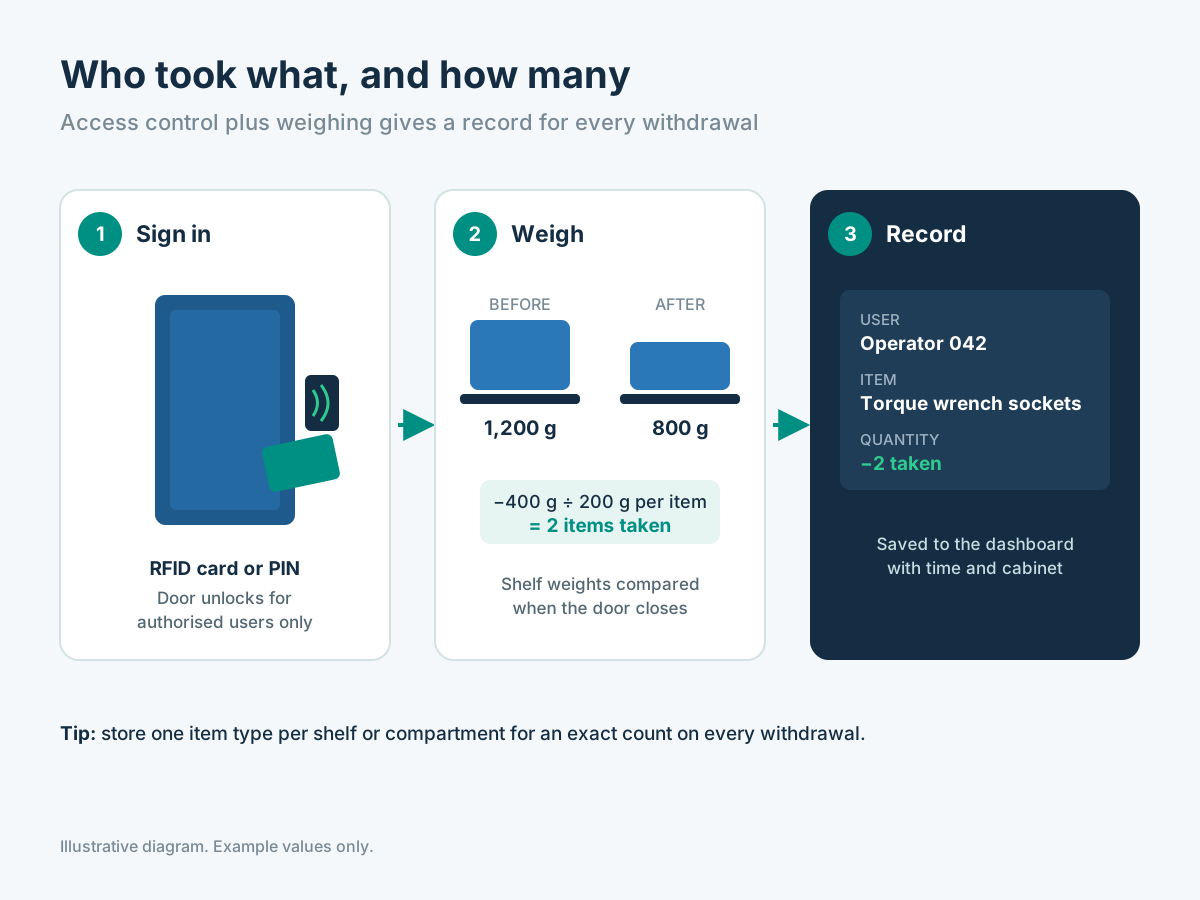
In a controlled cabinet, RFID or PIN authentication identifies the user before a session. The weight change at dedicated positions can then be associated with that user's session. Weight alone does not identify a person, and shared simultaneous access can make attribution ambiguous; the hardware and workflow must support the desired level of accountability.

03. Monitor — record movement and exceptions
Illustrative
04

04. Act — replenish before the line stops

Each item has a replenishment point chosen according to consumption, lead time and the factory's operating needs. When calculated stock crosses that point, the configured software can flag the position and add it to a refill list. Stores personnel or an approved supplier then know which materials should be prepared for the next replenishment round.

An operator can confirm a refill by physically replacing stock; the new measurement updates the location record. Purchasing teams use the history to adjust thresholds and review frequently consumed items. This closes the loop from measurement to practical action without promising that every unusual material will eliminate all manual verification.

TECHNOLOGY SELECTION

Why weight monitoring instead of relying only on barcodes?

Barcode, RFID and weighing technologies solve different problems. The right design may combine them rather than treating one as a universal replacement.

QuestionWeighing shelfBarcode / QR scanRFID identification
How is a change recorded?A measured weight difference at the storage positionA person or scanner captures a transactionA reader detects compatible tagged items
Can it calculate the quantity of identical loose parts?Yes, from calibrated item unit weightOnly when an item quantity is deliberately entered or scannedOnly if item/tag identities support the workflow
Does it identify the user?Not alone; combine with access controlOnly if the scan includes the user/accountOnly with reader and user/authentication architecture
Best fitFasteners, standardized consumables and continuous stock visibilityDiscrete assets, receiving and individual check-in/outIdentified returnable tools and tagged inventory
CONFIGURATION CHECKLIST

Five design decisions to make before installing

01

Item consistency

Confirm what one unit weighs and whether packaging or part variation changes that weight.

02

Position layout

Assign one SKU to each measuring zone or specify a separate identification workflow.

03

Loading

Know the maximum loaded weight and smallest meaningful removal or addition.

04

Users

Decide whether open access is acceptable or user-linked permissions are needed.

05

Replenishment

Agree reorder rules, alerts and who is responsible for refilling.

Frequently asked questions

Can a smart shelf count every type of product?

Weight counting is most reliable for known items with predictable unit weight and dedicated storage positions. The measurement approach should be piloted for mixed, delicate or variable materials.

Can users be linked to removals?

Yes, when controlled RFID or PIN access and a suitable sensor/session workflow are combined. The before-and-after stock change can be associated with the authenticated session.

MOVE FROM CONCEPT TO CONFIGURATION

We can help select the right smart inventory system.

Tell us about the items, users and locations involved. We can review the measuring positions, access workflow and replenishment requirements.

Request a Configuration →